

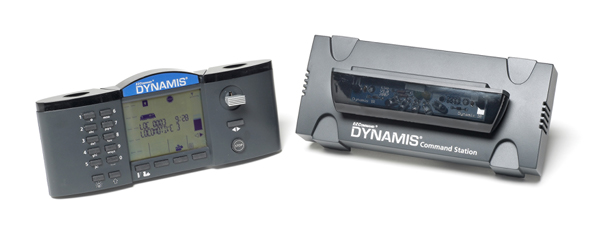
The Dynamis E-Z Command set includes three main components: a command base with receiver, a wireless handheld controller, and a 2.3-amp power supply.
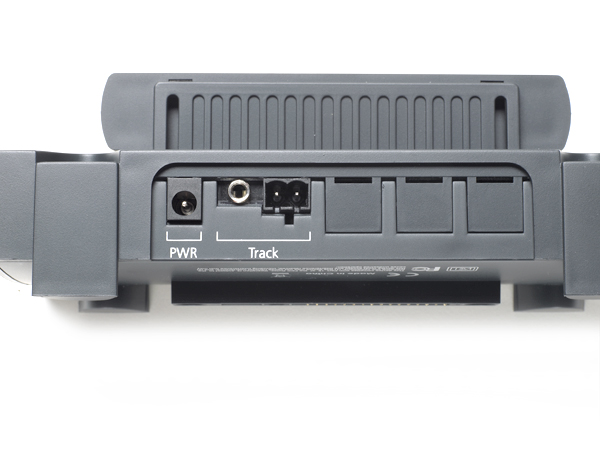
Easy to install. To set up the Dynamis all I had to do was connect the power supply to the command base and then connect the command base to the track. The back of the command base has three jacks: one for the power supply, one for the supplied wire that connects the base to terminal sections of Bachmann E-Z track, and one for a screw terminal. A plug-in screw terminal comes with the set to connect power leads to non-Bachmann track.
The wireless controller requires four AAA batteries, which are included. A gray on/off switch is located on the controller’s bottom edge. The controller was on for more than 24 hours before I had to replace the batteries.
When setting up and operating the Dynamis, you should keep in mind that the infrared link between the handheld and the command base requires a line of sight, just like a television remote control. The controller must be pointed toward the front of the infrared receiver on top of the command base. The receiver uses several sensors arrayed in a 180-degree arc to pick up and send signals.
The signal will be lost if a solid object, such as a wall or another operator, moves between the controller and the receiver.
With a clear line of sight between the controller and receiver, I operated trains from across our workshop, about 25 feet away. Operation was less reliable toward the extreme edges of the receiver’s 180-degree reception arc.
The set is designed for control with one wireless controller. I did run trains with an additional handheld from another set. The controllers can interfere with each other when used simultaneously.
You can upgrade the command station with the Dynamis Pro Box. This product lets you control the system with up to four wireless controllers and several tethered throttles. You can also use additional receivers to expand wireless coverage on larger layouts.
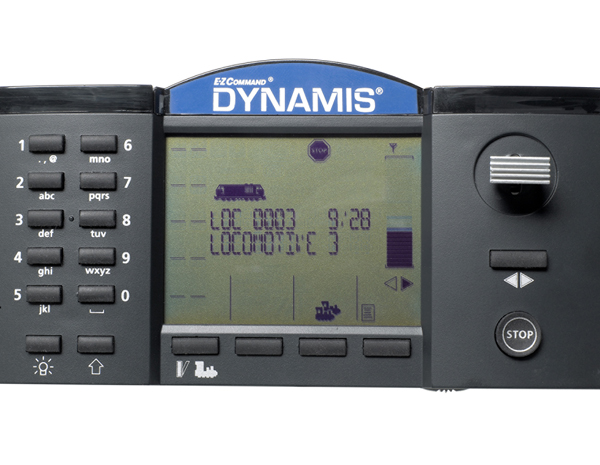
The system supports up to 21 control functions per locomotive. The left side of the controller has a headlight on/off button (Function 0), 10 alphanumeric keys (allowing access to functions 1 to 10), and a shift key for functions 11 to 20.
You also use these keys to enter locomotive addresses and names. For example, I added a Santa Fe FP45 to my roster with address 107 and the name SF FP45 107.
The right side of the controller has a stop button, direction button, and a joystick that moves up and down and side to side. Along with controlling locomotive speed, the joystick is used to scroll through menus and rosters.
The center of the controller has an LCD screen and four buttons underneath it. These buttons are used to access the icons that appear above them on the screen, such as a notebook for entering programming mode.
The leftmost button under the screen toggles between locomotive and accessory mode. I used accessory mode to trigger and program an E-Z track DCC-equipped turnout.
Two-way communication. The controller receives constant updates from the command base. A signal indicator in the upper right corner of the controller’s LCD screen shows the signal strength, much like a cell phone’s display. The screen displays the assigned locomotive’s address, its direction, and what speed step it’s on. A speed indicator bar on the right of the screen also moves up or down in conjunction with the throttle.
The menu screens effectively walk you through each task from changing a locomotive’s address to programming configuration variables (CVs) to setting up a consist. The Dynamis supports locomotive decoders that allow advanced consisting.
You can also program locomotives on the main (also called ops mode programming). This feature lets you program a locomotive without a programming track. (Your locomotive’s DCC decoder must have CV19 to support ops mode programming.)
However, in ops mode on the Dynamis you can change only a locomotive’s short address (1 to 127). For a locomotive’s long address (0001 to 9999) you will need to use a programming track that’s isolated from the rest of the layout, or else you’ll inadvertently change all the locomotives on your layout to that new address.
Fun to operate. I had a lot of fun running locomotives on my HO scale E-Z track test layout using the Dynamis system. I programmed locomotive addresses and CVs and set up consists.
Hal Miller, the editor of Model Retailer magazine, a sister publication of Model Railroader, also tested the system on his O scale layout by running a single-motor, DCC-and-sound equipped diesel. More than one O scale locomotive can max out the 2.3-amp power supply. Bachmann E-Z Command 5-amp power boosters can be used with the Dynamis system.
Easy-to-use programming options, a well thought out wireless throttle, and a line of products that expand the system, make the Bachmann Dynamis a great choice for both newcomers to the hobby and other modelers looking to add DCC to their model railroads.
Price: $300.00
Manufacturer:
Bachmann Industries Inc.
1400 E. Erie St.
Philadelphia, PA 19124
www.bachmanntrains.com
Description: two-way infrared wireless Digital Command Control system
Access to 21 functions
Backlit LCD screen
Cab lanyard
Control up to 40 locomotives or 40 consists of up to 5 locomotives each
Expandable modular design
Four AAA batteries included
9,999 locomotive addresses
Supports 14, 28, or 128 speed steps
2.3-amp power supply